
Big Discount Motion Camera For Car - mobile printer scanner GPRS-printer – Dragon Bridge Detail:
GPRS printer
Preparation:
1. SIM card: GPRS function is a must.
2. APN: short for Access Point Name, provided by Local GSM operator.
3. GPRS IP: 121.35.1.142
4. GPRS Port: 5000
GPRS IP and Port is provided by Furmate Communication Limited
5. Make an appointment with Furmate Communication Limited in advance, then we will open server and give online support
Quick to know about Hardware
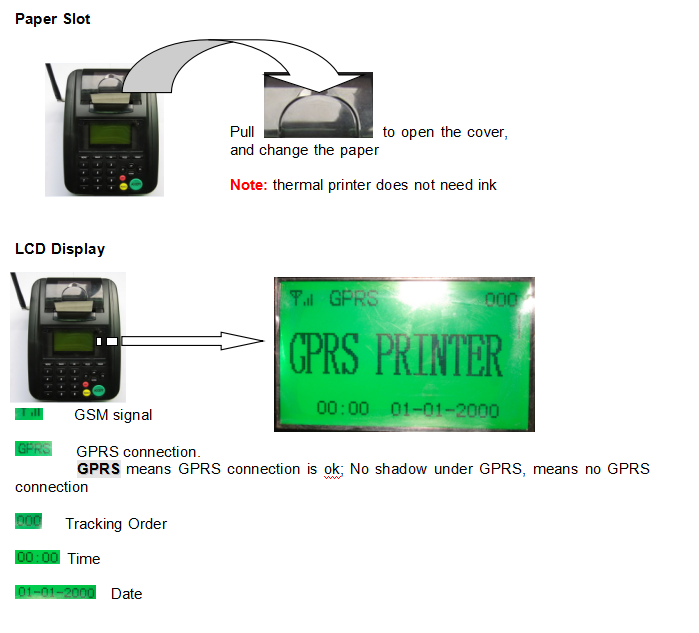
Keys
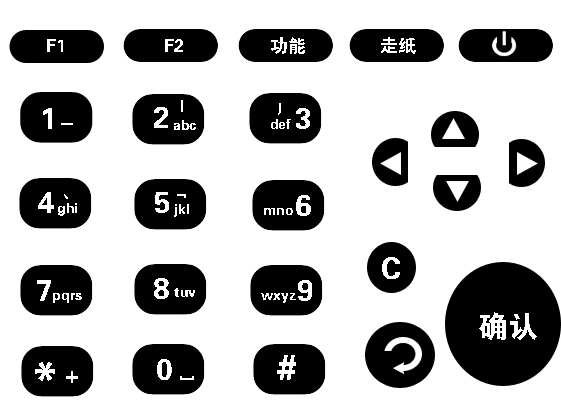
1 key: 1
2 key: a, b, c, A, B, C, 2
3 key: d, e, f, D, E, F, 3
4 key: g, h, i, G, H, I, 4
5 key: j, k, l, J, K, L, 5
6 key: m, n, o, M, N, O, 6
7 key: p, q, r, s, P, Q, R, S, 7
8 key: t, u, v, T, U, V, 8
9 key: w, x, y, z, W, X, Y, Z, 9
* key: special symbol
0 key: space, 0
# key: switch between letters and numbers
Del: delete the last letter or number
Reject: Reject order
Accept: Accept order
Menu: Menu, Enter and save
Back: Exit
Con/Disco: connect GPRS, or Dis-connect GPRS
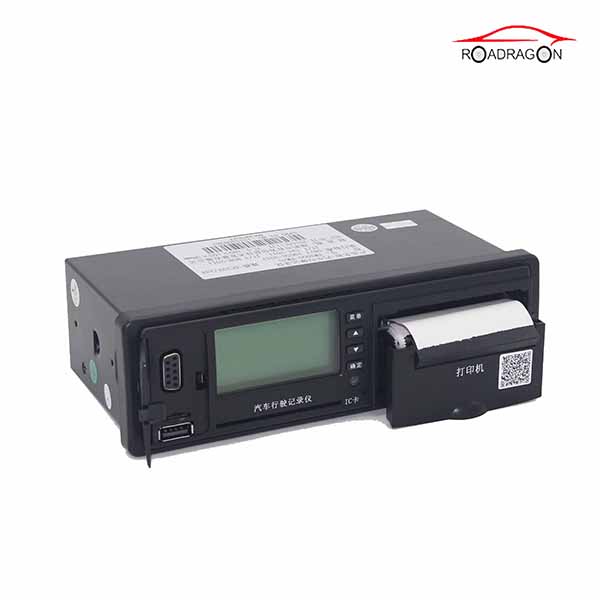
Feed: Push the paper
Print: Run the print program

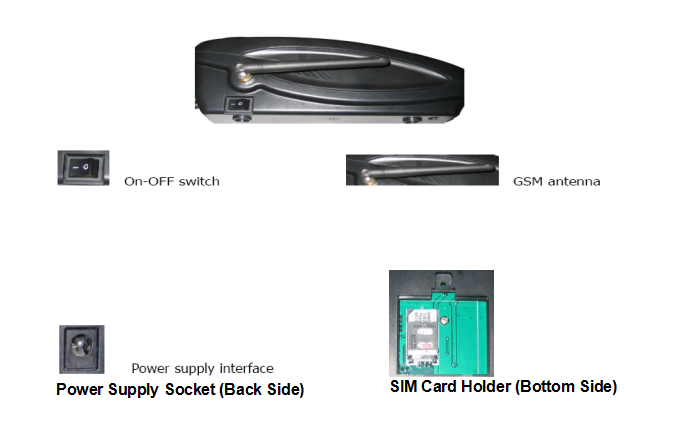
Interface
Quick to install
1. Insert SIM card into SIM card holder
2. Screw GSM antenna
3. Connect power adapter
4. Switch on
GPRS Printer begins to initialize…

It will take almost 20 seconds to register. When registered successfully, GPRS Printer will try to connect server automatically.
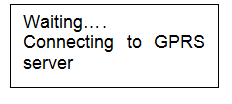
For the first use, When GPRS Printer try to connect server, pls press Con/Disc key to stop. Because of you should make some settings.

Quick to make Settings
In the menu, you can make settings through keyboard on GPRS Printer.
When GPRS Printer stand by, press Menu key, you can enter into sub-menu.
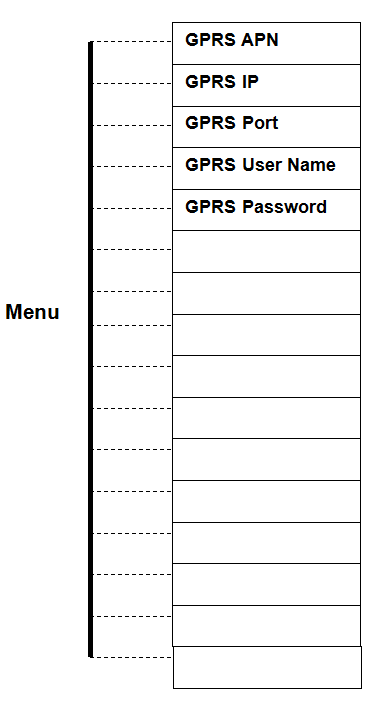
(1) GPRS APN:
1. In the sub-menu, press Up or Down key to move the cursor to GPRS APN, then press Menu key.
2. Press numeral keys to entry the letters; Press * key to insert symbols
3. Setting finished, press Menu key to save and exit
Now, take CMNET.CN for example. CMNET.CN is the APN for china mobile.
1. In the sub-menu, when the cursor on GPRS APN, press Menu key once
2. Press #key to capital letters. (ABC On the LCD ,meaning capital letters)
3. Press 2key 3 times, C is ok;
Then, press 6key 1time, M is ok;
Then, press 6key 2 times, N is ok
Then, press 3key 2 times, E is ok
Then, press 8key 1 time, T is ok
Then, press *, then menu key, get the symbol of.
Then, press 2key 3 times, C is ok
Then, press 6key 2 times, N is ok
4. Press Menu key to save the settings and exit
Note: if wrong input, press Del key to delete the last letter
(2) GPRS IP:
1. In the sub-menu, press Up or Down key to move the cursor to GPRS IP, then press Menu key.
2. Press numeral keys to entry the numbers; Press * key to insert symbols
3. Setting finished, press Menu key to save and exit
Now, server IP address is 121.35.1.142
1. In the sub-menu, move the cursor to GPRS IP, then press Menu key
2. Press # key to number. (123 On the LCD, meaning number)
3. Press 1key 1 time, 1 is ok;
Then, press 2key 1 time, 2 is ok;
Then, press 1key 1 time, 1 is ok
Then, press *, then Menu key, get the symbol of.
Then, press 3key 1 time, 3 is ok
Then, press 5key 1 time, 5 is ok
Then, press *, then Menu key, get the symbol of.
Then, press 1key 1 time, 1 is ok
Then, press *, then Menu key, get the symbol of.
Then, press 1key 1 time, 1 is ok
Then, press 4key 1 time1, 4 is ok
Then, press 2key 1 time, 2 is ok
4. Press Menu key to save the settings and exit
Note: if wrong input, press Del key to delete the last number
(3) GPRS Port:
1. In the sub-menu, press Up or Down key to move the cursor to GPRS Port, then press Menu key.
2. Press numeral keys to entry the number
3. Setting finished, press Menu key to save and exit
Now, GPRS Port is 5000
1. In the sub-menu, move the cursor to GPRS Port, then press Menu key
2. Press # key to number. (123 On the LCD, meaning number)
3. Press 5key 1 time, 5 is ok;
Then, press 0key 1time, 0 is ok;
Then, press 0key 1 time, 0 is ok
Then, press 0key 1 time, 0 is ok
4. Press Menu key to save the settings and exit
Note: if wrong input, press Del key to delete the last number
(4) GPRS User Name and GPRS Password:
For GPRS connection, User name and password is not a must in the most countries. So call your GSM operator to confirm.
If User name and Password is a must in your country, pls entry the related info, referencing to APN settings
All above settings are ok, press Back key to exit menu. Then press Con/Disco button to connect server
Server connection is ok, GPRS will on LCD. Then Furmate Communication Limited can receive info from GPRS printer, and can send order info to GPRS printer
Testing GPRS printer in local office
1. Click  to install server software into customer PC.
2. Get public IP address for your ADSL broadband through www.ip138.com
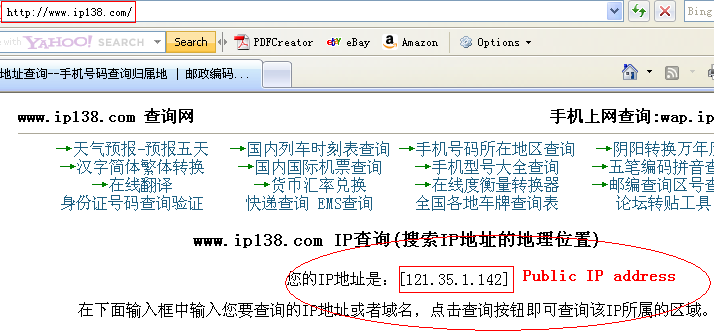
3. Get the IP address of your PC
4. In your ADSL router, find Forwarding, set the IP address of your PC as the virtual server, and arrange port number for your PC.
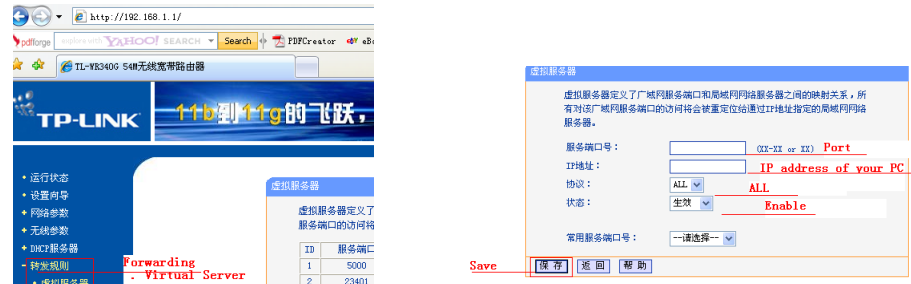
Product detail pictures:
Related Product Guide:
Indulge all of your trust issues with this tiny GPS tracking device | Fleet Management System Features
Uber Freight adds Fleet Mode feature to app | Jacksonville Fleet Management
"Sincerity, Innovation, Rigorousness, and Efficiency" could be the persistent conception of our enterprise to the long-term to produce together with clients for mutual reciprocity and mutual profit for Big Discount Motion Camera For Car - mobile printer scanner GPRS-printer – Dragon Bridge, The product will supply to all over the world, such as: Rotterdam , Slovenia , Mali , "Good quality, Good service " is always our tenet and credo. We take every effort to control the quality, package, labels etc and our QC will check every detail during producing and before shipment. We have been willing to establish long business relationship with all those who seek the high quality products and good service. We've got set up a wide sales network across European countries, North of America, South of America, Middle East, Africa, East Asia countries.Please contact us now, you will find our expert experience and high quality grades will contribute to your business.
 By Myra
from Mombasa
- 2016.11.20 15:58
Production management mechanism is completed, quality is guaranteed, high credibility and service let the cooperation is easy, perfect!
By Mary
from Germany
- 2015.09.29 17:23
-
Competitive Price for Used Auto Gps - vehicle ...
-
Top Suppliers Gps Tracking For Fleet Vehicles -...
-

China Cheap price Import Igm Tracking - Roadra...
-
Special Design for Locked Padlock - car black ...
-

2017 High quality Star Shipping Container Track...
-

Manufactur standard Gps Tracking For Trucking C...


