
Factory made hot-sale Fleet Management Tracking Software - credit card printer GPRS-printer – Dragon Bridge Detail:
GPRS printer
When got GPRS printer, you are suggested make a testing with Furmate Communication Limited remotely.
After above test, you can use the server software to test GPRS printer separately in your office.
Testing GPRS printer with factory remotely
Preparation:
1. SIM card: GPRS function is a must.
2. APN: short for Access Point Name, provided by Local GSM operator.
3. GPRS IP: 121.35.1.142
4. GPRS Port: 5000
GPRS IP and Port is provided by Furmate Communication Limited
5. Make an appointment with Furmate Communication Limited in advance, then we will open server and give online support
Quick to know about Hardware
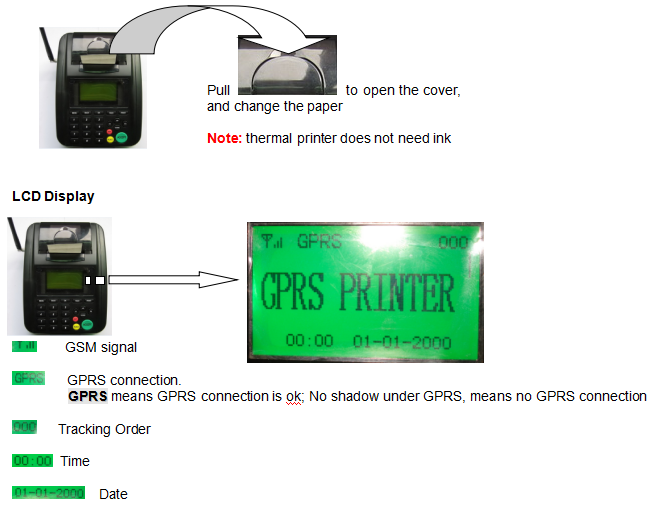
Paper Slot
Keys
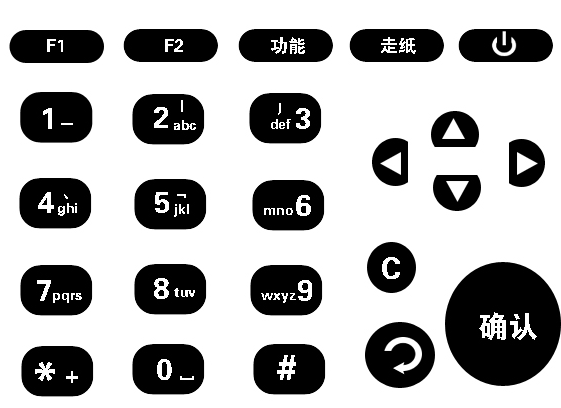
1 key: 1
2 key: a, b, c, A, B, C, 2
3 key: d, e, f, D, E, F, 3
4 key: g, h, i, G, H, I, 4
5 key: j, k, l, J, K, L, 5
6 key: m, n, o, M, N, O, 6
7 key: p, q, r, s, P, Q, R, S, 7
8 key: t, u, v, T, U, V, 8
9 key: w, x, y, z, W, X, Y, Z, 9
* key: special symbol
0 key: space, 0
# key: switch between letters and numbers
Del: delete the last letter or number
Reject: Reject order
Accept: Accept order
Menu: Menu, Enter and save
Back: Exit
Con/Disco: connect GPRS, or Dis-connect GPRS
Feed: Push the paper
Print: Run the print program

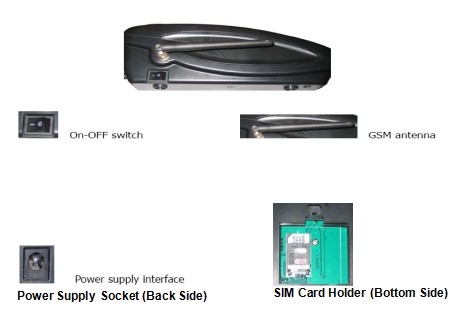
Interface
Quick to install
1. Insert SIM card into SIM card holder
2. Screw GSM antenna
3. Connect power adapter
4. Switch on
GPRS Printer begins to initialize…

It will take almost 20 seconds to register. When registered successfully, GPRS Printer will try to connect server automatically.

For the first use, When GPRS Printer try to connect server, pls press Con/Disc key to stop. Because of you should make some settings.
Quick to make Settings
In the menu, you can make settings through keyboard on GPRS Printer.
When GPRS Printer stand by, press Menu key, you can enter into sub-menu.
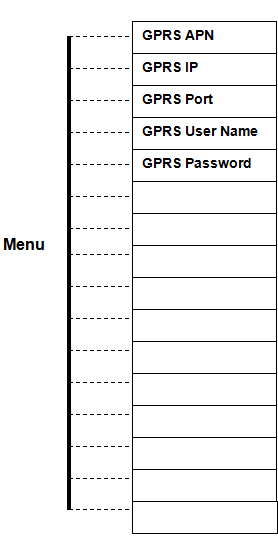
(1) GPRS APN:
1. In the sub-menu, press Up or Down key to move the cursor to GPRS APN, then press Menu key.
2. Press numeral keys to entry the letters; Press * key to insert symbols
3. Setting finished, press Menu key to save and exit
Now, take CMNET.CN for example. CMNET.CN is the APN for china mobile.
1. In the sub-menu, when the cursor on GPRS APN, press Menu key once
2. Press #key to capital letters. (ABC On the LCD ,meaning capital letters)
3. Press 2key 3 times, C is ok;
Then, press 6key 1time, M is ok;
Then, press 6key 2 times, N is ok
Then, press 3key 2 times, E is ok
Then, press 8key 1 time, T is ok
Then, press *, then menu key, get the symbol of.
Then, press 2key 3 times, C is ok
Then, press 6key 2 times, N is ok
4. Press Menu key to save the settings and exit
Note: if wrong input, press Del key to delete the last letter
(2) GPRS IP:
1. In the sub-menu, press Up or Down key to move the cursor to GPRS IP, then press Menu key.
2. Press numeral keys to entry the numbers; Press * key to insert symbols
3. Setting finished, press Menu key to save and exit
Now, server IP address is 121.35.1.142
1. In the sub-menu, move the cursor to GPRS IP, then press Menu key
2. Press # key to number. (123 On the LCD, meaning number)
3. Press 1key 1 time, 1 is ok;
Then, press 2key 1 time, 2 is ok;
Then, press 1key 1 time, 1 is ok
Then, press *, then Menu key, get the symbol of.
Then, press 3key 1 time, 3 is ok
Then, press 5key 1 time, 5 is ok
Then, press *, then Menu key, get the symbol of.
Then, press 1key 1 time, 1 is ok
Then, press *, then Menu key, get the symbol of.
Then, press 1key 1 time, 1 is ok
Then, press 4key 1 time1, 4 is ok
Then, press 2key 1 time, 2 is ok
4. Press Menu key to save the settings and exit
Note: if wrong input, press Del key to delete the last number
(3) GPRS Port:
1. In the sub-menu, press Up or Down key to move the cursor to GPRS Port, then press Menu key.
2. Press numeral keys to entry the number
3. Setting finished, press Menu key to save and exit
Now, GPRS Port is 5000
1. In the sub-menu, move the cursor to GPRS Port, then press Menu key
2. Press # key to number. (123 On the LCD, meaning number)
3. Press 5key 1 time, 5 is ok;
Then, press 0key 1time, 0 is ok;
Then, press 0key 1 time, 0 is ok
Then, press 0key 1 time, 0 is ok
4. Press Menu key to save the settings and exit
Note: if wrong input, press Del key to delete the last number
(4) GPRS User Name and GPRS Password:
For GPRS connection, User name and password is not a must in the most countries. So call your GSM operator to confirm.
If User name and Password is a must in your country, pls entry the related info, referencing to APN settings
All above settings are ok, press Back key to exit menu. Then press Con/Disco button to connect server
Server connection is ok, GPRS will on LCD. Then Furmate Communication Limited can receive info from GPRS printer, and can send order info to GPRS printer
Testing GPRS printer in local office
1. Click to install server software into customer PC.
2. Get public IP address for your ADSL broadband through www.ip138.com
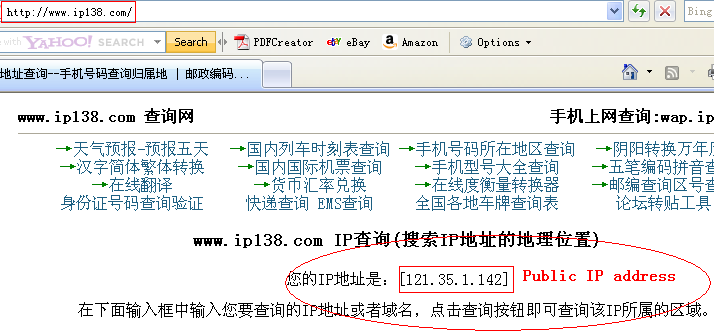
3. Get the IP address of your PC
4. In your ADSL router, find Forwarding, set the IP address of your PC as the virtual server, and arrange port number for your PC.
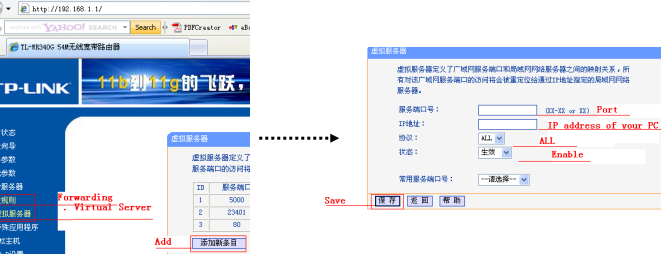
Settings
In the menu, you can make some settings through key board on GPRS Printer.
When GPRS Printer stand by, press Menu key, you can enter into sub-menu.
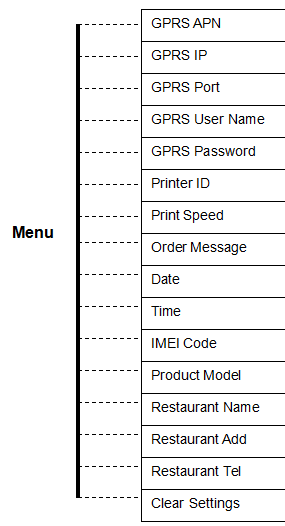
Settings for GPRS connection:
(1) GPRS APN:
1. In the sub-menu, press Up or Down key to move the cursor to GPRS APN, then press Menu key.
2. Press numeral keys (0key to 9key) to entry the letters; Press * key to insert symbols
3. Setting finished, press Menu key to save and exit
Now, take CMNET.CN for example. CMNET.CN is the APN for china mobile.
1. In the sub-menu, press Menu key once
2. Press #key to capital letters. (ABC On the LCD, meaning capital letters)
3. Press 2key 3 times, C is ok;
Then, press 6key 1time, M is ok;
Then, press 6key 2 times, N is ok
Then, press 3key 2 times, E is ok
Then, press 8key 1 time, T is ok
Then, press *, then menu key, get the symbol of.
Then, press 2key 3 times, C is ok
Then, press 6key 2 times, N is ok
4. Press Menu key to save the settings and exit
Note: if wrong input, press Del key to delete the last letter
(2) GPRS IP:
1. In the sub-menu, press Up or Down key to move the cursor to GPRS IP, then press Menu key.
2. Press numeral keys (0key to 9key) to entry the numbers; Press * key to insert symbols
3. Setting finished, press Menu key to save and exit
Now, server IP address is 192.168.1.100.
1. In the sub-menu, move the cursor to GPRS IP, then press Menu key
2. Press # key to number. (123 On the LCD, meaning number)
3. Press 1key 1 time, 1 is ok;
Then, press 9key 1 time, 9 is ok;
Then, press 2key 1 time, 2 is ok
Then, press *, then menu key, get the symbol of.
Then, press 1key 1 time, 1 is ok
Then, press 6key 1 time, 6 is ok
Then, press 8key 1 time, 8 is ok
Then, press *, then menu key, get the symbol of.
Then, press 1key 1 time, 1 is ok
Then, press *, then menu key, get the symbol of.
Then, press 1key 1 time, 1 is ok
Then, press 0key 1 time1, 0 is ok
Then, press 0key 1 time, 0is ok
4. Press Menu key to save the settings and exit
Note: if wrong input, press Del key to delete the last number
(3) GPRS Port:
1. In the sub-menu, press Up or Down key to move the cursor to GPRS Port, then press Menu key.
2. Press numeral keys (0key to 9key) to entry the number
3. Setting finished, press Menu key to save and exit
Now, GPRS Port is 23450.
1. In the sub-menu, move the cursor to GPRS Port, then press Menu key
2. Press # key to number. (123 On the LCD, meaning number)
3. Press 2key 1 time, 2 is ok;
Then, press 3key 1time, 3 is ok;
Then, press 4key 1 time, 4 is ok
Then, press 5key 1 time, 5 is ok
Then, press 0key 1 time1, 0 is ok
4. Press Menu key to save the settings and exit
Note: if wrong input, press Del key to delete the last number
(4)Printer ID:
Normally, set the SIM card number as printer ID.
(5) GPRS User Name and GPRS Password:
For GPRS connection, User name and password is not a must in the most countries. So call your GSM operator to confirm.
If User name and Password is a must in your country, pls entry the related info, referencing to APN settings
For GPRS connection, APN, IP ,Printer ID and Port is a must.
Settings for restaurant info:
Reference to APN setting, please set the info of restaurant.
Restaurant’s Name Add and Tel are in the sub-menu.
This info will show on the print note, so it is a must
Other settings:
Date: the form is MM-DD-YYYY. M is month, D is date, Y is year
Time: the form is H-M, H is hour, M is minute. 24 hours
Print Speed: H is quick, M is normal, L is slow. M is the recommended value
Clear Settings: Be careful to use this function. If choice Yes, restore factory settings.
Order Message: it is helpful for you to re-print note for some reason
In the screen of order message, you can press Up or Down key to track the right order number, then press print key to re-print the note.
IMEI Code: IMEI code marked on GSM/GPRS module, can not modify
Product Model: fixed SP-G4-01
Receipt Print
5-1-1 New order arrived, GPRS Printer will print the receipt automatically.
5-1-2 Receipt print is over, GPRS Printer will send beep tone to remind operator to make a further confirm
5-1-2-1 Press Accept key to accept this order
OR
5-1-2-2 Press Reject key to reject this order
OR
5-1-2-3 If no operation in 60 seconds, order is ignored
When paper is not enough, voice alarming on and Paper Out displays on the LCD. So please change the paper immediately

Paper changed, GPRS Printer reminds you to press print key to be the status of print. Then voice alarm stopped.

If paper is not enough, GPRS Printer cannot print complete receipt for the last order. So, paper changed, GPRS printer can re-print receipt for the last order automatically.
Product detail pictures:
Related Product Guide:
IoT In Aerospace And Defense Market Future Growth with Technology 2019 to 2025 | Fleet Management System Features
Amazon Map Tracker lets you follow your package delivery in real time | How To Put Gps On Car
To become the stage of realizing dreams of our employees! To build a happier, more united and extra professional workforce! To reach a mutual advantage of our prospects, suppliers, the society and ourselves for Factory made hot-sale Fleet Management Tracking Software - credit card printer GPRS-printer – Dragon Bridge, The product will supply to all over the world, such as: Botswana , Jordan , Bangladesh , Please really feel free to send us your requirements and we'll respond to you asap. We have got a professional engineering group to serve for your just about every detailed needs. Cost-free samples could be sent for you personally to understand much more information. In an effort to meet your requires, please really feel free to make contact with us. You may send us emails and contact us directly. Moreover, we welcome visits to our factory from around the globe for much better recognizing of our organization. nd items. In our trade with merchants of numerous countries, we usually adhere for the principle of equality and mutual benefit. It is actually our hope to market, by joint efforts, each trade and friendship to our mutual advantage. We look forward to getting your inquiries.
 By Sandy
from Hongkong
- 2016.11.01 17:04
By Sandy
from Hongkong
- 2016.11.01 17:04
Good quality and fast delivery, it's very nice. Some products have a little bit problem, but the supplier replaced timely, overall, we are satisfied.
By Lesley
from Luxembourg
- 2015.10.01 14:14
-
OEM/ODM Factory Marchwood Tip - id card printe...
-
Reliable Supplier Hanjin Container Tracking - ...
-
One of Hottest for Car Engine Shut Off Systems ...
-
Good Quality Fleet Leasing Services - gps gsm ...
-
Super Lowest Price Fleet Management Group - ca...
-

Hot New Products Real Time Vehicle Tracking - ...
