

Manufacturer of Fleet Management Brisbane - device tracker Long Connection GPS Tracker MT008G – Dragon Bridge Detail:
GPS vehicle communication terminal
(GPS+GSM+SMS/GPRS)
V1.2.1017
Model:G-MT008G
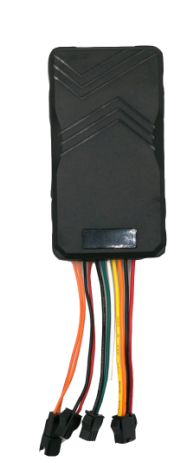
MT008G is a special version of MT008. MT008 is a GPS tracker that easily installs to a car’s power source. Perfect for tracking fleet vehicles, this best-in-class GPS device features improved accuracy, and it’s designed specifically to make locating and routing vehicles as simple as possible. It has built-in vibration sensor for intelligent vehicle anti-theft.
Guide for quick installation and use
Please read the installation guide carefully before use in order to get the correct way of installation and quick operation. If the appearance and color of the product are changed, please take the object as the object
1. Product accessories map:
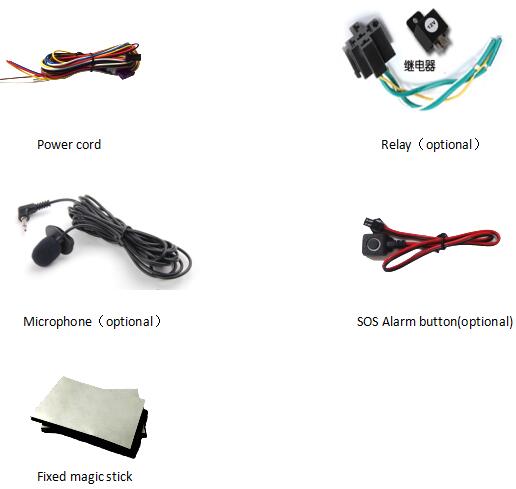
2. Product function:
- Adopt UBXLO-7020 GPS module and 3G (HSDPA/WCDMA) communication module.
- GPS+GSM base station dual mode location
- Data communication: SMS/GPRS/HSDPA R5/WCDMA R99/EDGE/CSD (TCP/UDP)
- Real-time query location
- Chinese address query
- Timed tracking
- Pitch tracking
- Mobile phone positioning
- Built-in large capacity standby battery
- Electronic fence
- GPS blind area alarm
- An electric alarm
- Speeding alarm
- Mileage report
- Pronunciation monitoring (selection)
- SOS emergency alarm (selection)
- Remotely cutting off car oil / electricity (selection)
Specification parameter
| Items | description |
| Size of the whole machine size | 98*53*13mm |
| weight | 50g |
| Input power supply | DC 9V~80V/1.5A |
| Backup battery | 180mAh/4.2V |
| Normal standby power | < 50mA/12V’s ordinary standby current |
| working temperature | -30 C ~75 C |
| Working humidity | 5%~95% |
| Working hours | Power saving for 6 hours, normally open for 4 hours |
| LED indicator lamp | The 2 LED indicator indicates the GSM/GPS state |
| Button / switch | 1 SOS buttons (for short message or dialing), 1 power switches. |
| Microphone | External connection (selection) |
| GSM band | GSM 850/900/1800/1900MHz, UMTS850/2100 |
| GPS chip | UBXLO-7020 generation high sensitivity chip |
| GPS sensitivity | -159dB |
| positioning accuracy | 10 meters |
3.1.Setting GPRS transmission location data interval time
The terminal default GPRS transmission location data interval is 120S, that is, upload every
120 seconds to the background server.
Locate the data. To set the GPRS transport location data interval, you can edit the GPRS
timing setting instructions.
Upmove123456 120 reply to Set OK upload interval settings (default 120 seconds)
3.2. The interval setting of entering dormancy
Auto123456 reply Set OK automatic working mode (default) device without any alarm, no operation after 5 minutes, the device enters the dormancy state: GPS, GPRS. Telephone or SMS or shock will wake up equipment immediately.
The time interval from the working state to the dormancy state of the terminal is 5 minutes.
Instruction format: sleep,123456,10 reply OK, open sleep 10: for 10 minutes 0: means no sleep
3.3. language and time zone settings
Terminal provides Chinese and English two language display, different regions of time according to the time zone settings.
Instruction format: 109# reply OK handover in English
Zone123456 E08 reply OK modified time zone E08: East eight district.
3.4. Restart the terminal
When the terminal works GPRS link exception, such as: the terminal parameter is set correctly, but the terminal is not online, you can send SMS instructions to the terminal. In order to enable the terminal to perform remote restart, the terminal can resume normal operation.
Instruction format: CQ reply to system reset OK! Device restart
3.5. Restore the factory setting
When the terminal setup parameters are not properly set, you can send short message instructions to restore terminal parameters to the default setting value of the terminal, try to restore the terminal to normal work.
Restore the factory setting instruction: FORMAT
When the terminal receives the instruction, it will restore the setting parameters of the terminal to the default value.
4.Log on to the global positioning service platform
Service platform landing site: www.dbgps.com

If you already have login account information on the platform, you can login directly to the background server. Otherwise, please contact your dealer to open an online account for you. The login account and the login password are provided.
Enter the user login platform, fill in the login account and password, and submit it to the service platform.
Product detail pictures:


Related Product Guide:
Andy Transport Launches Fleet Management and Maintenance Venture – Maintenance | Jacksonville Fleet Management
Should You Track Your Teen’s Location? | How To Put Gps On Car
Our advantages are reduced prices,dynamic product sales workforce,specialized QC,solid factories,superior quality services for Manufacturer of Fleet Management Brisbane - device tracker Long Connection GPS Tracker MT008G – Dragon Bridge, The product will supply to all over the world, such as: Oslo , Jordan , France , We focus on providing service for our clients as a key element in strengthening our long-term relationships. Our continual availability of high grade products in combination with our excellent pre-sale and after-sales service ensures strong competitiveness in an increasingly globalized market. We are willing to cooperate with business friends from at home and abroad and create a great future together.
 By Murray
from Hungary
- 2015.06.09 12:42
By Murray
from Hungary
- 2015.06.09 12:42
The factory technical staff not only have high level of technology, their English level is also very good, this is a great help to technology communication.
By Miguel
from Congo
- 2015.07.27 12:26
-
Ordinary Discount Functions Of Fleet Management...
-
OEM Manufacturer Exhibition Trailers Uk - vehi...
-
Factory wholesale Lockwatch - HYFMDVR truck mo...
-
Super Lowest Price Sci Container Tracking - au...
-
High Performance Best Truck Tracking Systems - ...
-
One of Hottest for Vehicle Camera Video - auto...
